


Trusted by 1M+ creators
Change Color of Image
Change the color of an image in seconds with AI
No credit card required
4.6
2,100+ reviews














Change the color of an image in seconds
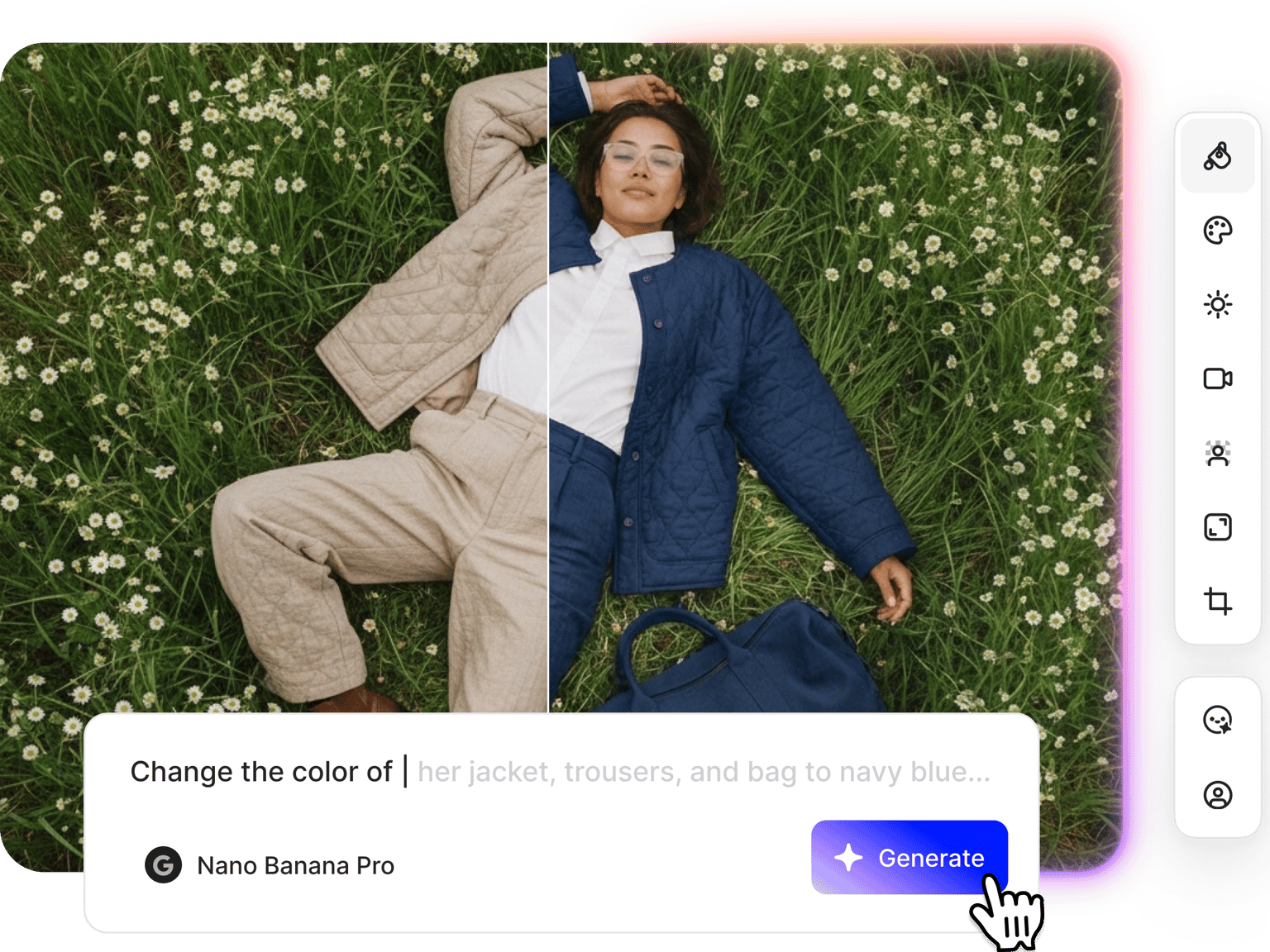
Replace colors in any image using VEED's AI picture color changer. Upload your photo and describe what you want to change: swap product colors for seasonal campaigns, update background colors for social media, or match exact brand colors using hex codes. No Photoshop skills required. The AI color replacement tool handles color changes while preserving details and textures. Generate product variations, test different color palettes, and create cohesive content without reshoots.
How to change the color of an image:
Step 01
Upload your image
Upload the photo where you want to change colors. You can upscale low-resolution images first if needed.
Step 02
Select a model and describe the color change
Choose an AI model that fits your needs. Describe the color change you want: "Change background to pink," "Make the dress navy blue," or "Replace red with forest green." For exact brand colors, you can input hex codes.
Step 03
Download or create a video
Save your recolored image or generate variations with different color combinations. You can also animate your image with image-to-video AI or add it to video projects.
Learn More
Watch this Nano Banana Pro demo:
Color changer with prompt-based editing
Color editing usually requires learning Photoshop layers, masks, and selection tools. VEED's color changer works through simple prompts. Tell the AI what to change, and it handles the technical work. Want to test various product colors? Describe each one. Working with brand guidelines? Input your hex codes directly for precise color matching.
Image color changer for brand consistency
Update product photos to match your brand colors. No need to schedule new photoshoots. Change background colors across your entire product catalog. Recolor images for seasonal campaigns—pink and red for Valentine's Day, green and gold for Christmas, pastels for spring collections. Need logo variations for different contexts? Recolor your logo for light or dark backgrounds. Or turn your logo white for video overlays and social media posts.
Color replacer that connects to video creation
Most color replacement tools end at the download button. VEED connects your recolored images directly to video workflows. Change your product's background color, then animate the image with image-to-video AI. Recolor multiple images and combine them in the video editor with text, music, and transitions. Create seasonal campaign videos using color-matched product shots. Edit your images and produce video content in one platform.
FAQ
Upload your image to VEED's AI image editor, select a model, and describe which colors to change. You can use descriptive prompts like "change background to blue" or input hex codes for exact colors. The AI replaces the specified colors while preserving image details. Download the result or test different color combinations.
Image color changing works for:
Product & e-commerce:
- Product variations and colorway options
- Photography consistency across catalogs
- A/B testing product colors
Marketing & branding:
- Seasonal campaigns (holiday colors, themed promotions)
- Logo recoloring (turn logo white for dark backgrounds)
- Brand consistency across materials
Content Creation:
- Social media content with cohesive palettes
- Testing aesthetic directions before finalizing designs
Check your brand style guide if you have one; most brand guidelines include hex codes for primary and secondary colors. You can also search "[color name] hex code" in Google (like "navy blue hex code" or "forest green hex code") to find the exact code you need. Input the hex code directly into your prompt for precise color matching. Test different AI models to see which handles your specific hex code most accurately.
Yes. Upload your video to our video editor and use video color correction to fine-tune brightness and color balance. You can also apply video coloring effects to apply filters and match footage with your brand aesthetic.
VEED’s color changer uses a credit-based system. Each AI model costs a different number of credits per generation. You'll see the exact credit cost before you generate, so you can choose models that fit your budget. Check our pricing page for plan details and credit options.
Loved by creators.
Loved by the Fortune 500
“
With VEED I didn't need 15 tutorials - I jumped straight in and started editing.

Gwenne Wilcox
Founder,
Brand Brainery
“
You can go beyond choppping things. VEED actually makes my videos look great.

Michael Glover
Demand Gen Manager,
ConvertFlow
“
The first four videos i created with VEED got over 40,000 impressions on LinkedIn.

Travis Tyler
Senior Content Producer,
PandaDoc
“
I found VEED at the right time: if you're making UGC ads and not using Eye Contact Correction and Noise Reduction on VEED you're missing out on ROI.

Sebastian Schurgers
Head of Growth Marketing,
Gronda
“
With VEED I didn't need 15 tutorials - I jumped straight in and started editing.
Gwenne Wilcox
Founder,
Brand Brainery
“
You can go beyond choppping things. VEED actually makes my videos look great.
Michael Glover
Demand Gen Manager,
ConvertFlow
“
The first four videos i created with VEED got over 40,000 impressions on LinkedIn.
Travis Tyler
Senior Content Producer,
PandaDoc
“
I found VEED at the right time: if you're making UGC ads and not using Eye Contact Correction and Noise Reduction on VEED you're missing out on ROI.
Sebastian Schurgers
Head of Growth Marketing,
Gronda
“
The first four videos i created with VEED got over 40,000 impressions on LinkedIn.
Travis Tyler
Senior Content Producer,
PandaDoc
“
I found VEED at the right time: if you're making UGC ads and not using Eye Contact Correction and Noise Reduction on VEED you're missing out on ROI.
Sebastian Schurgers
Head of Growth Marketing,
Gronda
“
With VEED I didn't need 15 tutorials - I jumped straight in and started editing.
Gwenne Wilcox
Founder,
Brand Brainery
“
You can go beyond choppping things. VEED actually makes my videos look great.
Michael Glover
Demand Gen Manager,
ConvertFlow
Discover more
- Add Jewelry to Photo
- Add Noise to Image
- Add Text to Photo
- AI Action Figure Generator
- AI Background Changer
- AI Blog Post Image Generator
- AI Business Card Generator
- AI Christmas Photo
- AI Clothes Changer
- AI Color Correction
- AI Coloring Page Generator
- AI Cosplay
- AI Doll Generator
- AI Embroidery Generator
- AI Expression Changer
- AI Face Editor
- AI Fairy
- AI Family Portrait
- AI Filter Remover
- AI Flyer Generator
- AI Ghostface Generator
- AI God Image Editor
- AI Greeting Card Generator
- AI Hair Color Changer
- AI Hairstyle Changer
- AI Image Variation Generator
- AI Leprechaun Generator
- AI LinkedIn Photo
- AI Magazine Cover Generator
- AI Makeup
- AI Mascot Generator
- AI Mask Generator
- AI Mugshot Generator
- AI NFT Generator
- AI Passport Photo
- AI Pet Portrait Generator
- AI Photo Restoration
- AI Pinup Generator
- AI Pose Changer
- AI Product Photography
- AI Renaissance Painting
- AI Replace
- AI Room Design
- AI Sculpture
- AI Shoe Generator
- AI Smile Generator
- AI Snow
- AI Stencil Maker
- AI Time Machine
- AI Vintage Photo Generator
- AI Wedding Photo Generator
- AI Yourself
- Baby Face Generator
- Bald Filter
- Beard Filter
- Body Shape Editor
- Buzz Cut Filter
- Change Eye Color AI
- Color Palette Generator
- Furry AI Generator
- Image Text Enhancer
- Medal Generator
- Object Remover
- Old Filter
- Photo Angle Change AI
- Photo Date Editor
- Photo to Sketch
- Photo to Watercolor
- Pop Art Generator
- Relight Photo
- Sketch to Image AI
- Speech Bubble
- Stained Glass Generator
- Steampunk AI Generator
- Thanksgiving AI
- Tie Dye Generator
- Turn Photo into Line Drawing
More from VEED
Best AI Image Generators: Top Tools for Creating Stunning Visuals in 2026
From text prompts to breathtaking visuals in mere seconds, AI image generators have revolutionized the way we create digital art. Whether you're building content for social, school, or just for fun, turning ideas into visuals has never been easier. This guide breaks down the best AI image generators of 2025. You'll see what each tool does well, where it struggles, and who it’s built for, so you can pick the right one for your goals and budget.

AI Art Prompts: How to Write Better Prompts, Creative Examples, and Tools to Try
Getting your AI art prompts is the key to winning with generative AI tools. Learn how to write better prompts here.

How to Cartoonize Your Photo with AI (Step-by-Step Guide)
Learn how to cartoonize your photo using AI, and how to use ChatGPT to craft the perfect visual prompt to bring your unique style to life.
Trusted by 1M+ creators
When it comes to amazing videos, all you need is VEED
No credit card required
More than a color changer
VEED lets you do more than swap colors in images. Once you've changed colors in your image, bring it into the video editor to add text animation, subtitles, music, and effects. You can even generate images from scratch with our AI image generator. VEED is an AI video creation platform where you can create, edit, and export images and videos. Get started now.