


Trusted by 1M+ creators
Remove Black Background
Online black background remover for images
No credit card required
4.6
2,100+ reviews














Remove black background from any image
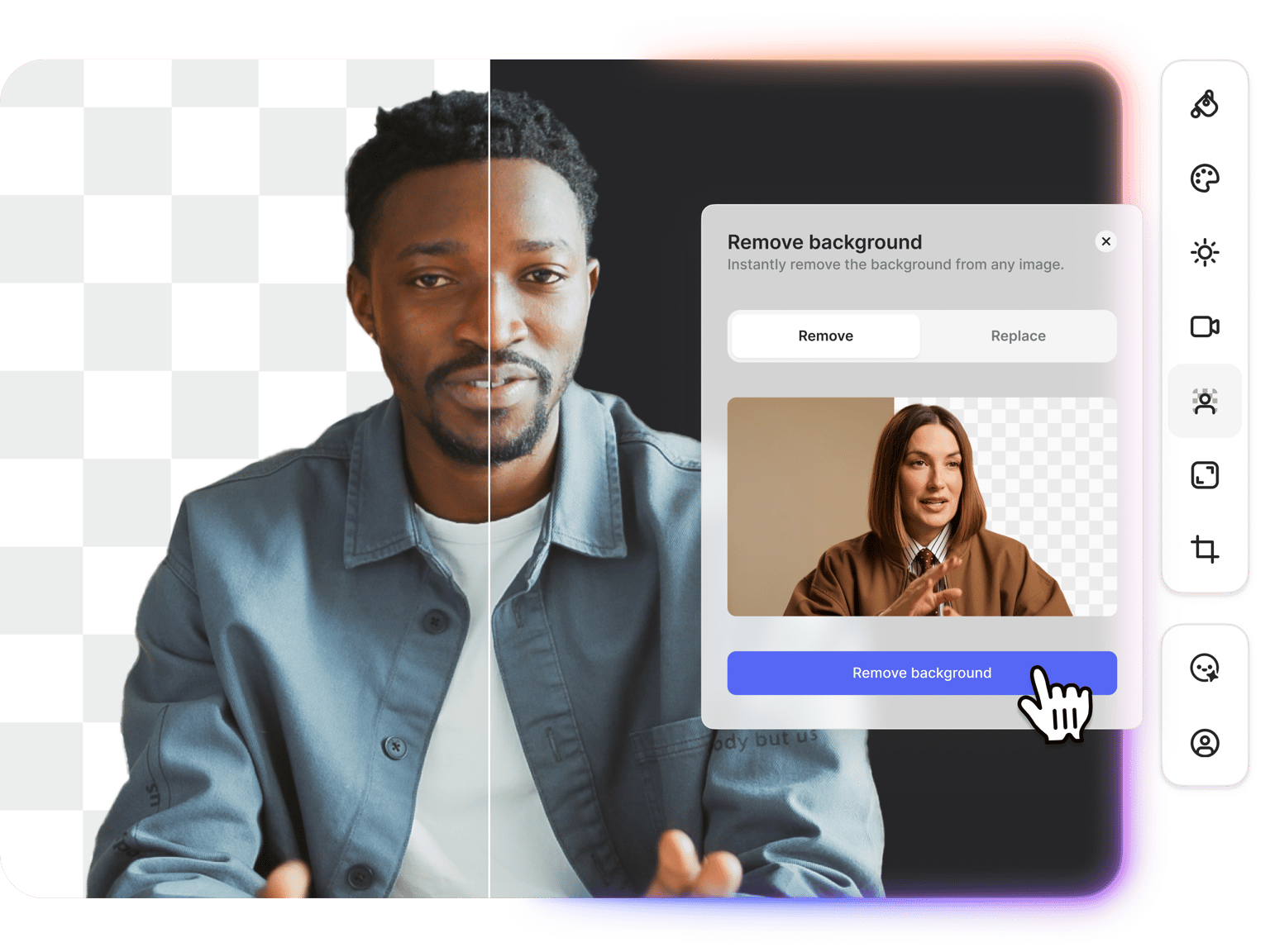
Need to remove a black background from a photo, logo, or graphic? VEED's black background remover extracts your subject from dark backgrounds and lets you replace it with a white, transparent, or custom background. Works for product photos shot on black backdrops, logos exported on dark backgrounds, gaming graphics, and screenshots from video editing software. Upload your image, remove the black background, and download. Try it now.
How to remove black background from image:
Step 01
Upload your image
Upload the photo or graphic with a black background. Works with portraits, product shots, logos, PNGs, and thumbnails. You can upscale low-resolution images first for better results.
Step 02
Remove or replace black background
Click 'Remove background.' Select ‘Remove’ to get a transparent PNG, or select ‘Replace’ to upload a new background or generate a new one. Type a prompt like “change background to white” for quick replacement.
Step 03
Download your image
Save your image with transparency or your new background. Ready for websites, e-commerce listings, presentations, or video projects.
Learn More
Also check out our video background remover:
Change black background to white
Change a black background to white for product photos, portraits, and graphics. Upload your image, click 'Remove background,' and select Replace. Type “change background to white” in the prompt. The AI removes the dark background and swaps it with clean white. Great for e-commerce listings, professional profiles, and graphics that need to sit on light-colored websites or documents.
Add black background to photo
Add a black background to photos for dramatic portraits, YouTube thumbnails, or cinematic product shots. Remove the existing background and replace it with black. Black backgrounds make subjects pop and work well for profile pictures, headshots, and product imagery. You can also use our AI background generator to make custom dark backgrounds from text prompts: dark gradients, black studio backdrops, moody textures, and more.
Remove black background from logos and PNGs
Extract logos and graphics from black backgrounds for use on any platform. Remove black backgrounds from PNG files and download with transparency preserved. Works for gaming graphics, stream graphics, thumbnails, and logos stuck on dark backgrounds. Get clean edges so your graphics stand out on websites, videos, and marketing materials.
FAQ
- Upload your image to VEED's black background remover.
- Click 'Remove background' and select Remove for a transparent PNG, or select Replace to swap to white or another color.
- Download your edited image with transparency or your new background.
- Upload your image with the black background.
- Click 'Remove background,' select Replace, and type “white background” in the prompt.
- Download your image with the new white background. Works for product photos, portraits, and graphics.
- Upload your image and click 'Remove background.'
- Select Replace and type "black background" in the prompt. Or specify custom dark backgrounds by describing details.
- Download your image with the new black background.
VEED uses a credit-based system for AI image editing. Background removal and replacement cost credits for every use. A paid plan with AI credit add-ons gives you access to the black background editor, transparent PNG exports, AI background replacement, and the option to bring images into video projects. Check our pricing page for current plans.
Loved by creators.
Loved by the Fortune 500
“
With VEED I didn't need 15 tutorials - I jumped straight in and started editing.

Gwenne Wilcox
Founder,
Brand Brainery
“
You can go beyond choppping things. VEED actually makes my videos look great.

Michael Glover
Demand Gen Manager,
ConvertFlow
“
The first four videos i created with VEED got over 40,000 impressions on LinkedIn.

Travis Tyler
Senior Content Producer,
PandaDoc
“
I found VEED at the right time: if you're making UGC ads and not using Eye Contact Correction and Noise Reduction on VEED you're missing out on ROI.

Sebastian Schurgers
Head of Growth Marketing,
Gronda
“
With VEED I didn't need 15 tutorials - I jumped straight in and started editing.
Gwenne Wilcox
Founder,
Brand Brainery
“
You can go beyond choppping things. VEED actually makes my videos look great.
Michael Glover
Demand Gen Manager,
ConvertFlow
“
The first four videos i created with VEED got over 40,000 impressions on LinkedIn.
Travis Tyler
Senior Content Producer,
PandaDoc
“
I found VEED at the right time: if you're making UGC ads and not using Eye Contact Correction and Noise Reduction on VEED you're missing out on ROI.
Sebastian Schurgers
Head of Growth Marketing,
Gronda
“
The first four videos i created with VEED got over 40,000 impressions on LinkedIn.
Travis Tyler
Senior Content Producer,
PandaDoc
“
I found VEED at the right time: if you're making UGC ads and not using Eye Contact Correction and Noise Reduction on VEED you're missing out on ROI.
Sebastian Schurgers
Head of Growth Marketing,
Gronda
“
With VEED I didn't need 15 tutorials - I jumped straight in and started editing.
Gwenne Wilcox
Founder,
Brand Brainery
“
You can go beyond choppping things. VEED actually makes my videos look great.
Michael Glover
Demand Gen Manager,
ConvertFlow
Discover more
More from VEED
Best AI Image Generators: Top Tools for Creating Stunning Visuals in 2026
From text prompts to breathtaking visuals in mere seconds, AI image generators have revolutionized the way we create digital art. Whether you're building content for social, school, or just for fun, turning ideas into visuals has never been easier. This guide breaks down the best AI image generators of 2025. You'll see what each tool does well, where it struggles, and who it’s built for, so you can pick the right one for your goals and budget.

AI Art Prompts: How to Write Better Prompts, Creative Examples, and Tools to Try
Getting your AI art prompts is the key to winning with generative AI tools. Learn how to write better prompts here.

How to Cartoonize Your Photo with AI (Step-by-Step Guide)
Learn how to cartoonize your photo using AI, and how to use ChatGPT to craft the perfect visual prompt to bring your unique style to life.
Trusted by 1M+ creators
When it comes to amazing videos, all you need is VEED
No credit card required
More than a black background editor
VEED gives you complete image and video editing tools. Remove black backgrounds from images, then drop them into video projects. Need to remove dark backgrounds from video footage? Use our video background remover for talking heads and product demos. Edit images, create videos, add subtitles, and export for any platform. Start creating with VEED now.