


Trusted by 1M+ creators
Braces Filter
Try on braces, remove them, or pick your colors
No credit card required
4.6
2,100+ reviews














See yourself with or without braces
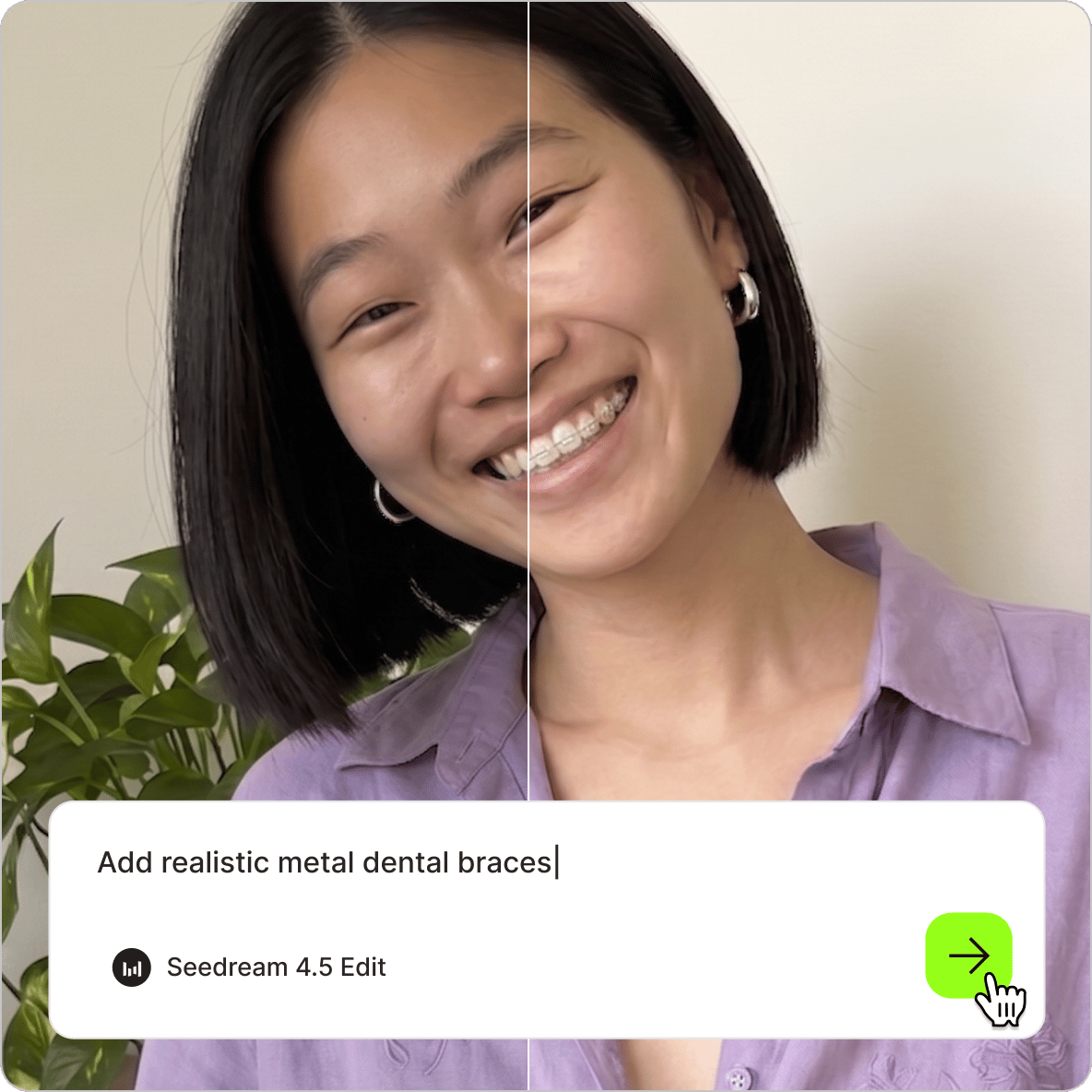
See what braces would look like on you, visualize the day they come off, or plan your next band color. The AI braces filter can show you in seconds. Upload your photo and describe what you want: realistic metal braces, clear aligners, a specific band color, or no braces at all. The AI braces generator applies the change to your photo, so you can see the result instantly. Try the braces filter online. No app download needed.
How to use the AI braces filter:
Step 01
Upload your photo
Upload a clear, front-facing portrait to the image editor. Good lighting and a visible smile work best.
Step 02
Describe the braces you have in mind
To add braces: you can try ‘add realistic metal braces,’ ‘braces with blue bands,’ or ‘clear aligners.’ To remove them: try ‘remove braces and show natural teeth’ or ‘no braces, straight smile.’ For color changes: specify the band color directly, like ‘change braces bands to green.’
Step 03
Download or create a project
Save your braces photo or take it into a video project. Animate the image or build a before-and-after reveal video in our editor.
Learn More
Watch this Nano Banana Pro demo:
Try on braces by describing it
Describe the look you want, and the AI applies it to your photo. Try realistic metal braces with colored bands, or ceramic braces — all by typing a prompt in plain language. You can also specify band colors and how prominent the braces appear. Unlike preset-only tools, this braces simulator gives you prompt-based control. Try the AI hairstyle changer in the same session to see how a new hairstyle pairs with braces. Generate as many variations as you need.
See yourself without braces before they come off
Already wearing braces and curious what straight teeth will look like on you? Use the braces remover filter to generate a preview. Upload your photo and type ‘remove braces and show natural teeth’ or ‘no braces, clean smile.’ The AI interprets your prompt and removes the braces from the image. It’s also useful for before-and-after content — pair your current photo with an AI-generated preview using the AI face editor.
Plan your band colors before your appointment
Choosing braces band colors is harder than it sounds when you have two minutes in the orthodontist's chair. Use the braces color filter to test combinations on your own photo first. Type the color you want to try — ‘change braces bands to dark purple’ or ‘teal and white bands.’ Save your favorite to bring to your next appointment as a reference. Once you have the image you want, you can also animate it with image-to-video AI and create online content.
FAQ
An AI braces filter can show you what braces look like on your photo. Upload a clear, front-facing portrait and describe the braces style you want to try: metal, ceramic, or clear aligners. The AI generates a realistic preview based on your description. For best results, use a photo with good lighting and a visible, relaxed smile.
Yes. Upload your photo and prompt ‘remove braces’ or ‘no braces, clean straight smile.’ The AI interprets your request and generates a version of your photo without the braces. The braces removal filter works best on photos where your teeth are clearly visible. Results vary by photo quality and AI model; you can try and compare a few models to find the cleanest output.
For the most realistic braces filter results, use a high-quality front-facing photo with good lighting. Describe the braces type specifically in your prompt: ‘add realistic metal braces with silver brackets.’ Try different AI models and compare results. Some models handle teeth and facial detail better than others. Advanced models like Nano Banana Pro tend to produce more realistic results.
The braces filter uses a credit-based system. Each image generation costs credits based on the AI model you use. Subscribe to a paid plan with AI credits to access AI filters and more content creation tools. Check our pricing page for more information.
Loved by creators.
Loved by the Fortune 500
“
With VEED I didn't need 15 tutorials - I jumped straight in and started editing.

Gwenne Wilcox
Founder,
Brand Brainery
“
You can go beyond choppping things. VEED actually makes my videos look great.

Michael Glover
Demand Gen Manager,
ConvertFlow
“
The first four videos i created with VEED got over 40,000 impressions on LinkedIn.

Travis Tyler
Senior Content Producer,
PandaDoc
“
I found VEED at the right time: if you're making UGC ads and not using Eye Contact Correction and Noise Reduction on VEED you're missing out on ROI.

Sebastian Schurgers
Head of Growth Marketing,
Gronda
“
With VEED I didn't need 15 tutorials - I jumped straight in and started editing.
Gwenne Wilcox
Founder,
Brand Brainery
“
You can go beyond choppping things. VEED actually makes my videos look great.
Michael Glover
Demand Gen Manager,
ConvertFlow
“
The first four videos i created with VEED got over 40,000 impressions on LinkedIn.
Travis Tyler
Senior Content Producer,
PandaDoc
“
I found VEED at the right time: if you're making UGC ads and not using Eye Contact Correction and Noise Reduction on VEED you're missing out on ROI.
Sebastian Schurgers
Head of Growth Marketing,
Gronda
“
The first four videos i created with VEED got over 40,000 impressions on LinkedIn.
Travis Tyler
Senior Content Producer,
PandaDoc
“
I found VEED at the right time: if you're making UGC ads and not using Eye Contact Correction and Noise Reduction on VEED you're missing out on ROI.
Sebastian Schurgers
Head of Growth Marketing,
Gronda
“
With VEED I didn't need 15 tutorials - I jumped straight in and started editing.
Gwenne Wilcox
Founder,
Brand Brainery
“
You can go beyond choppping things. VEED actually makes my videos look great.
Michael Glover
Demand Gen Manager,
ConvertFlow
Discover more
Explore related tools
More from VEED
Best AI Image Generators: Top Tools for Creating Stunning Visuals in 2026
From text prompts to breathtaking visuals in mere seconds, AI image generators have revolutionized the way we create digital art. Whether you're building content for social, school, or just for fun, turning ideas into visuals has never been easier. This guide breaks down the best AI image generators of 2025. You'll see what each tool does well, where it struggles, and who it’s built for, so you can pick the right one for your goals and budget.

AI Art Prompts: How to Write Better Prompts, Creative Examples, and Tools to Try
Getting your AI art prompts is the key to winning with generative AI tools. Learn how to write better prompts here.

How to Cartoonize Your Photo with AI (Step-by-Step Guide)
Learn how to cartoonize your photo using AI, and how to use ChatGPT to craft the perfect visual prompt to bring your unique style to life.
Trusted by 1M+ creators
When it comes to amazing videos, all you need is VEED
No credit card required
More than a braces filter
VEED is an AI video creation platform where AI filters are just the starting point. Use the braces filter to visualize a look, then bring your image into a full video creation workflow. Animate your photo with image-to-video AI to create a before-and-after reveal, or use Fabric 1.0 to build a talking head video with your braces image as the visual. Add captions, music, and transitions in the video editor. Turn your ideas into post-ready videos in minutes. Start creating with VEED today.