


Trusted by 1M+ creators
AI Braids
Try braided hairstyles on your photo with AI. See how braids look on you from every angle
No credit card required
4.6
2,100+ reviews














See how you'd look with braids
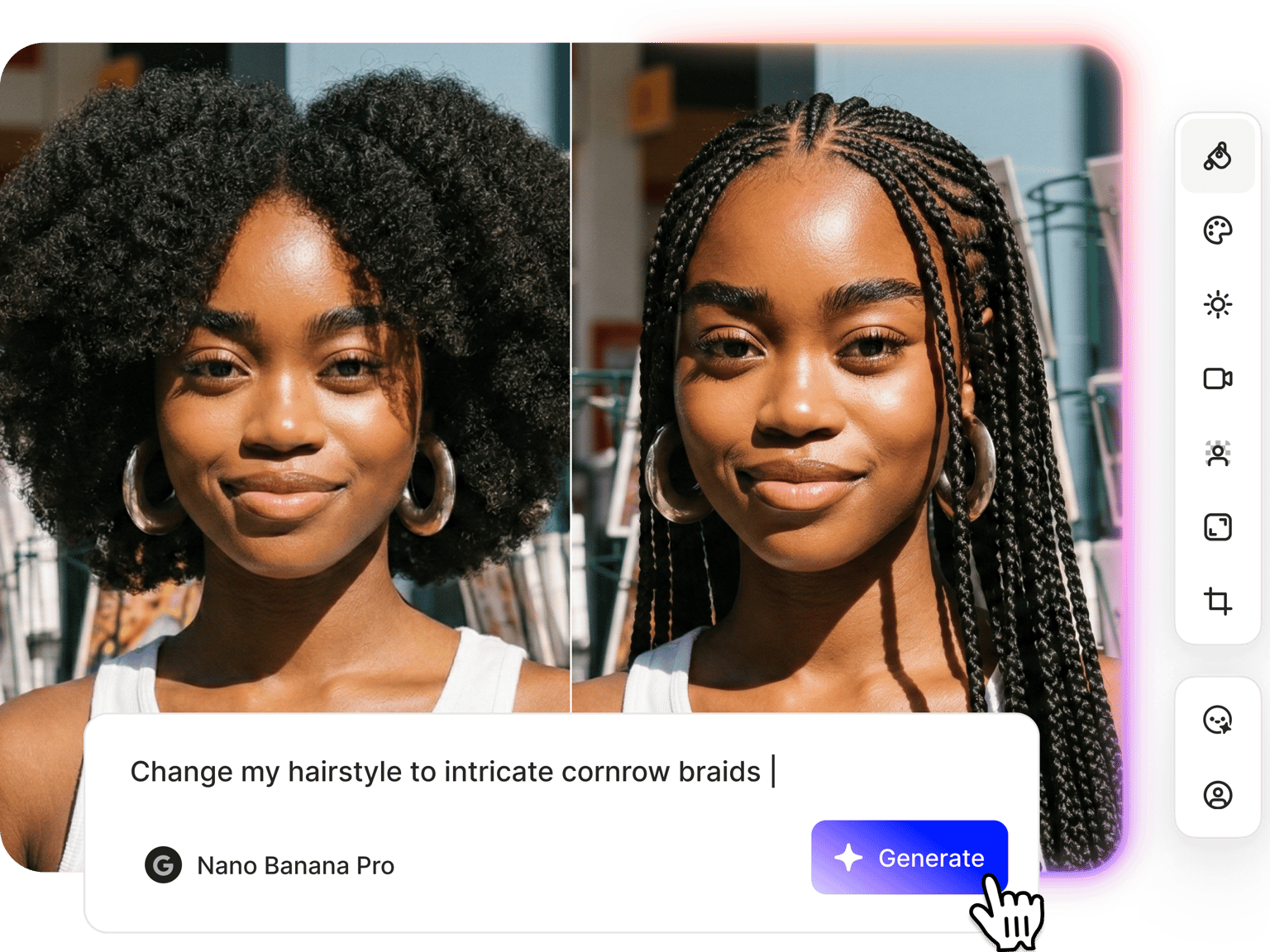
Want to get braids, but not sure how they would look on you? VEED’s AI braids filter lets you see for yourself. Upload your photo and describe the style you have in mind. Try on box braids, AI cornrows, or twists. View the braids from multiple angles — side view, back view, and three-quarter view. No more guesswork, no app download. Try our braided hair filter now.
How to use the AI braids filter:
Step 01
Upload your photo
Upload a clear, front-facing photo to the image editor. Good lighting helps the AI generate a more accurate result.
Step 02
Describe the braid style you want
Describe the braids you want to see. The more specific your prompt, the more tailored the result.
Step 03
Download or turn it into a video
Save your braided hair photo or take it further. Animate the look with image-to-video AI or bring it into a video project.
Learn More
Watch this Nano Banana Pro demo:
AI braids with prompt-based control
Describe the braid style you want, and VEED generates it on your photo. Specify braids, length, and color in one prompt. The AI braids filter isn't limited to preset options, so you can explore different styles and compare results. Try cornrow styles or longer braids. You can even change your hair color by including it in your prompt.
Braid filter that shows the full picture
Most hair try-on tools only show you a front-facing result. With VEED's braid filter, you can use camera angle presets or type a prompt to check a side profile, back view, or three-quarter shot. See how braids fall at the back, how they frame your face from the side, and whether the overall length works for you before committing.
Style your hair, then bring it to video
Once you have a braided style you want to work with, you can do more than save the photo. Animate it with Fabric 1.0 to build a talking head video, or drop it into a project with image-to-video AI. Build a brand persona with a distinct look, develop a character for social content, or create campaign visuals, all from one reference photo.
FAQ
Yes. AI can apply braided hairstyles to your photo, but results vary depending on photo quality, lighting, and the AI model you select. Nano Banana tends to work well for hairstyle changes. Think of the AI braid filter as a visualization tool, useful for exploring styles and narrowing down options before you sit on the chair.
- Upload a photo to VEED's AI braids filter tool
- Describe the style you want. Apply a cornrows filter, box braids filter, and more.
- Generate your image and use camera angle controls to check how the braids look from the side or back
This works for anyone exploring a new look, whether you're trying braids for the first time or looking for a reference image before booking a stylist.
Some braided hairstyles like cornrows and box braids carry deep cultural roots and historical significance in Black and African communities. If you're exploring these styles for the first time, take time to research and understand where these styles come from before jumping on a trend. When you're ready to get the look, finding a stylist who specializes in the style is a good place to start.
VEED uses a credit-based system for AI filters. Each image generation costs credits based on the AI model you use. Subscribe to a paid plan with AI credit add-ons to access AI filters and more content creation tools. Check our pricing page for more information.
Loved by creators.
Loved by the Fortune 500
“
With VEED I didn't need 15 tutorials - I jumped straight in and started editing.

Gwenne Wilcox
Founder,
Brand Brainery
“
You can go beyond choppping things. VEED actually makes my videos look great.

Michael Glover
Demand Gen Manager,
ConvertFlow
“
The first four videos i created with VEED got over 40,000 impressions on LinkedIn.

Travis Tyler
Senior Content Producer,
PandaDoc
“
I found VEED at the right time: if you're making UGC ads and not using Eye Contact Correction and Noise Reduction on VEED you're missing out on ROI.

Sebastian Schurgers
Head of Growth Marketing,
Gronda
“
With VEED I didn't need 15 tutorials - I jumped straight in and started editing.
Gwenne Wilcox
Founder,
Brand Brainery
“
You can go beyond choppping things. VEED actually makes my videos look great.
Michael Glover
Demand Gen Manager,
ConvertFlow
“
The first four videos i created with VEED got over 40,000 impressions on LinkedIn.
Travis Tyler
Senior Content Producer,
PandaDoc
“
I found VEED at the right time: if you're making UGC ads and not using Eye Contact Correction and Noise Reduction on VEED you're missing out on ROI.
Sebastian Schurgers
Head of Growth Marketing,
Gronda
“
The first four videos i created with VEED got over 40,000 impressions on LinkedIn.
Travis Tyler
Senior Content Producer,
PandaDoc
“
I found VEED at the right time: if you're making UGC ads and not using Eye Contact Correction and Noise Reduction on VEED you're missing out on ROI.
Sebastian Schurgers
Head of Growth Marketing,
Gronda
“
With VEED I didn't need 15 tutorials - I jumped straight in and started editing.
Gwenne Wilcox
Founder,
Brand Brainery
“
You can go beyond choppping things. VEED actually makes my videos look great.
Michael Glover
Demand Gen Manager,
ConvertFlow
Discover more
More from VEED
Best AI Image Generators: Top Tools for Creating Stunning Visuals in 2026
From text prompts to breathtaking visuals in mere seconds, AI image generators have revolutionized the way we create digital art. Whether you're building content for social, school, or just for fun, turning ideas into visuals has never been easier. This guide breaks down the best AI image generators of 2025. You'll see what each tool does well, where it struggles, and who it’s built for, so you can pick the right one for your goals and budget.

AI Art Prompts: How to Write Better Prompts, Creative Examples, and Tools to Try
Getting your AI art prompts is the key to winning with generative AI tools. Learn how to write better prompts here.

How to Cartoonize Your Photo with AI (Step-by-Step Guide)
Learn how to cartoonize your photo using AI, and how to use ChatGPT to craft the perfect visual prompt to bring your unique style to life.
Trusted by 1M+ creators
When it comes to amazing videos, all you need is VEED
No credit card required
More than AI braid styles
VEED connects your image edits to a full content workflow. Change hairstyles, adjust facial expressions, and swap backgrounds. Create graphic variations for social media campaigns. Plus, animate photos and build out video projects with our image-to-video AI tools. Streamline your content creation with VEED. Sign up today.