


Trusted by 1M+ creators
AI Dance
Use AI to generate dancing images from still photos. Create AI dance videos in a few clicks
No credit card required
4.6
2,100+ reviews














Generate AI dance videos: Turn photos to videos
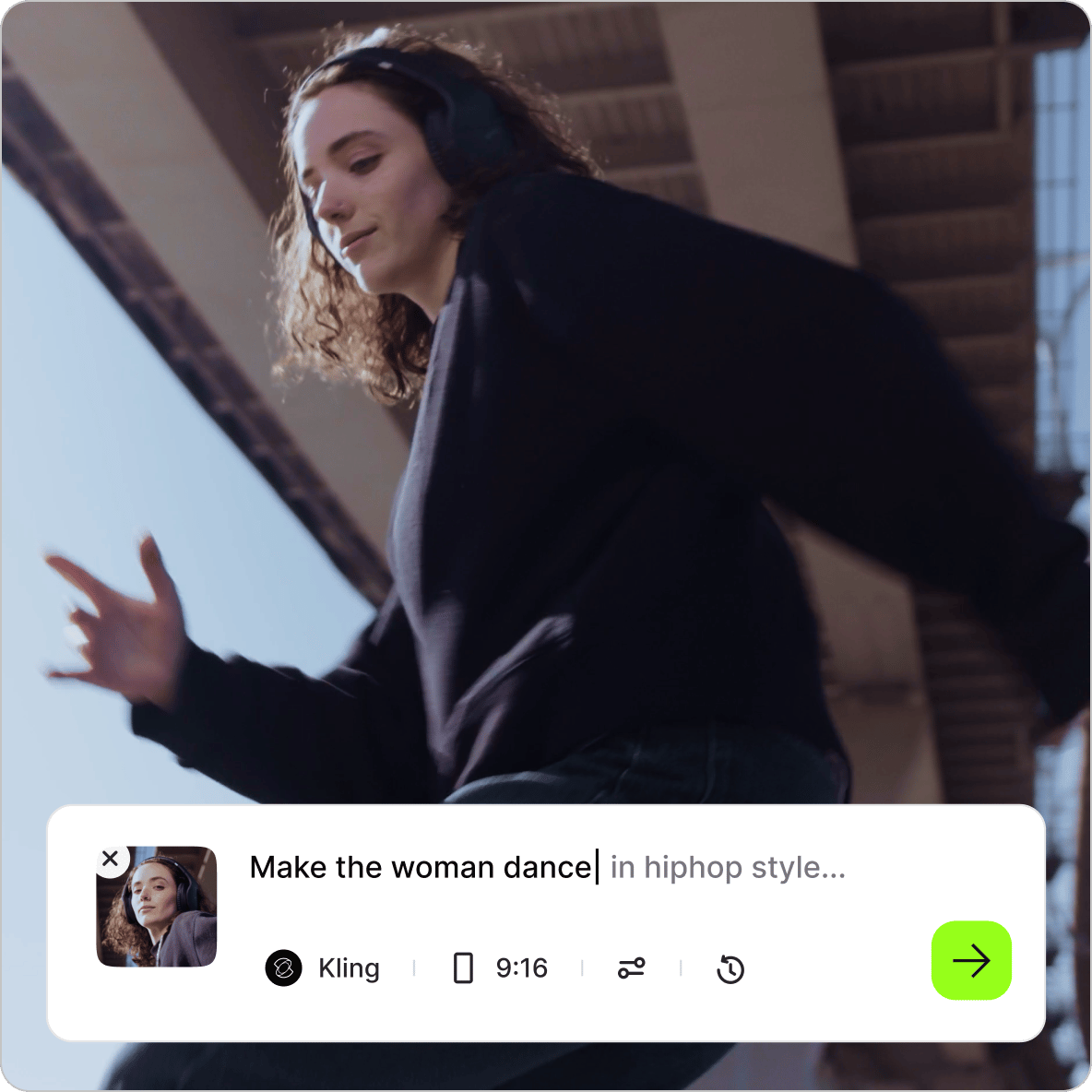
Use the AI generator to turn photos into dynamic videos. The AI dance app image-to-video generator breathes life into your photos. No animation skills required. The artificial intelligence tool will convert your still photos into video content. Simply upload your image, describe the movement you want to see, and generate a video using the AI video generator.
How to use the AI dance generator:
Step 01
Upload
Upload your image. Choose any photo you want to bring to life.
Step 02
Type a prompt
Describe the movement you want to see — walking, camera panning, zooming, and more.
Step 03
Generate
Click ‘Generate’ and watch your short video come to life within minutes. The video will appear as a scene in the editor.
Learn More
Learn more about generating AI dancing videos:
Make photos dance with AI and text prompts
Create AI-generated videos from your images in a few clicks. Just upload your photo, type a simple prompt describing what you want to see, and our AI technology will handle the rest. Use the tool for body swap videos, generate belly dancer videos, and make the photos do dance moves instantly!
Make a picture dance for social media
Get more views and followers on social media by posting videos instead of photos. Static images get buried in the noise; Moving images grab attention. Turn product photos into AI dance videos instantly. Using the built-in video editor, you can also add your branding, captions, and music! Stand out on social media with photo animations.
Try the AI dancing video generator and AI tools for free!
Generate AI dance videos from photos for free instantly; no upfront signup required. You can dive right in and start creating. Upload your image, see the results, and decide if it works for you—all before creating an account. You can also try the AI avatar generator to create videos with talking avatars. Or clone your voice and add instant voiceovers to your content.
FAQ
Turn static images into engaging clips for product showcases, social media posts, logo animations, and presentation intros. They’re also great for digital ads, website headers, and e-commerce listings. These short videos capture attention more effectively than still images.
- Upload your photos to VEED's AI video maker.
- Type a descriptive prompt of the motion you want to see (like "camera slowly zooming in" or “walking forward”), and click generate.
- Within minutes, your static image will turn into a dynamic video clip.
Alternatively, you can create a photo video using our intuitive online editor.
Our image-to-video generator supports JPG, PNG, and WebP formats. For best results, use high-quality images with clear subjects that aren't blurry or pixelated.
Once you upload your photo, ensure that you accurately describe the video you want to generate. Be specific about desired movements—"slowly zoom in on the face," "camera pan from left to right," or "person nodding their head." Describe camera actions clearly and keep instructions focused on realistic, achievable animations for your specific image.
Do not use the image-to-video generator to create harmful content, infringe any third-party rights, or defame anyone. Choose images you have the right to use, avoid placing subjects in misleading contexts, and respect privacy considerations. You can read our full terms here.
Loved by creators.
Loved by the Fortune 500
“
With VEED I didn't need 15 tutorials - I jumped straight in and started editing.

Gwenne Wilcox
Founder,
Brand Brainery
“
You can go beyond choppping things. VEED actually makes my videos look great.

Michael Glover
Demand Gen Manager,
ConvertFlow
“
The first four videos i created with VEED got over 40,000 impressions on LinkedIn.

Travis Tyler
Senior Content Producer,
PandaDoc
“
I found VEED at the right time: if you're making UGC ads and not using Eye Contact Correction and Noise Reduction on VEED you're missing out on ROI.

Sebastian Schurgers
Head of Growth Marketing,
Gronda
“
With VEED I didn't need 15 tutorials - I jumped straight in and started editing.
Gwenne Wilcox
Founder,
Brand Brainery
“
You can go beyond choppping things. VEED actually makes my videos look great.
Michael Glover
Demand Gen Manager,
ConvertFlow
“
The first four videos i created with VEED got over 40,000 impressions on LinkedIn.
Travis Tyler
Senior Content Producer,
PandaDoc
“
I found VEED at the right time: if you're making UGC ads and not using Eye Contact Correction and Noise Reduction on VEED you're missing out on ROI.
Sebastian Schurgers
Head of Growth Marketing,
Gronda
“
The first four videos i created with VEED got over 40,000 impressions on LinkedIn.
Travis Tyler
Senior Content Producer,
PandaDoc
“
I found VEED at the right time: if you're making UGC ads and not using Eye Contact Correction and Noise Reduction on VEED you're missing out on ROI.
Sebastian Schurgers
Head of Growth Marketing,
Gronda
“
With VEED I didn't need 15 tutorials - I jumped straight in and started editing.
Gwenne Wilcox
Founder,
Brand Brainery
“
You can go beyond choppping things. VEED actually makes my videos look great.
Michael Glover
Demand Gen Manager,
ConvertFlow
Explore related tools
More from VEED

VEED x Haiper: Bring Your Ideas to Life with AI Text-to-Video
VEED partnered with Haiper to create an AI text-to-video tool that turns prompts into videos. Discover more about this collaboration here

How to Make AI Videos with VEED: Bring Your Ideas to Life
Want to learn how to make AI videos with VEED? Check out this starter guide to take your video projects from A to Z in the blink of AI.

How to Make a GIF from a Video (in 5 Simple Steps)
Want to convert a clip into a shareable GIF? Learn how to make a GIF from a video in 5 easy steps with VEED.
Trusted by 1M+ creators
When it comes to amazing videos, all you need is VEED
No credit card required
More than an AI dance video generator
Take your dance videos further. VEED is an AI video creation platform that lets you animate images with the best image-to-video models like Veo 3.1, Kling 3 Pro, and Hailuo 2.3. Try slow zooms, dynamic camera pans, or fluid character movement to find the motion style that fits your content. Then shape the output. Add your logo, brand colors, and fonts. Combine clips, and export a video that looks like your brand made it, not AI.